Command reference
The triage trio — scan, inspect,
bottleneck — plus doctor. Every command takes a
job by its name or id and connects via
your configured profile.
Flags shown here are the common ones. Run flinkit <command>
--help for the complete, version-accurate list for your build.
flinkit scan
Lists every running job on the cluster at a glance — state, parallelism, restart count, and checkpoint health. Start here to find the job you care about.
$ flinkit scan
JOB                 STATE        PARALLELISM   RESTARTS   CHECKPOINT
orders-rollup       RESTARTING   2             21         failing
sessionize-clicks   RUNNING      8             0          ok
fraud-features      RUNNING      4             0          backpressured
The ok / warn /
critical colors are flinkit's severity cues —
the same ones you'll see in inspect and
findings.
flinkit inspect
The main event: a single-screen live triage dashboard for one job. Pass a job name or id.
$ flinkit inspect orders-rollup --watch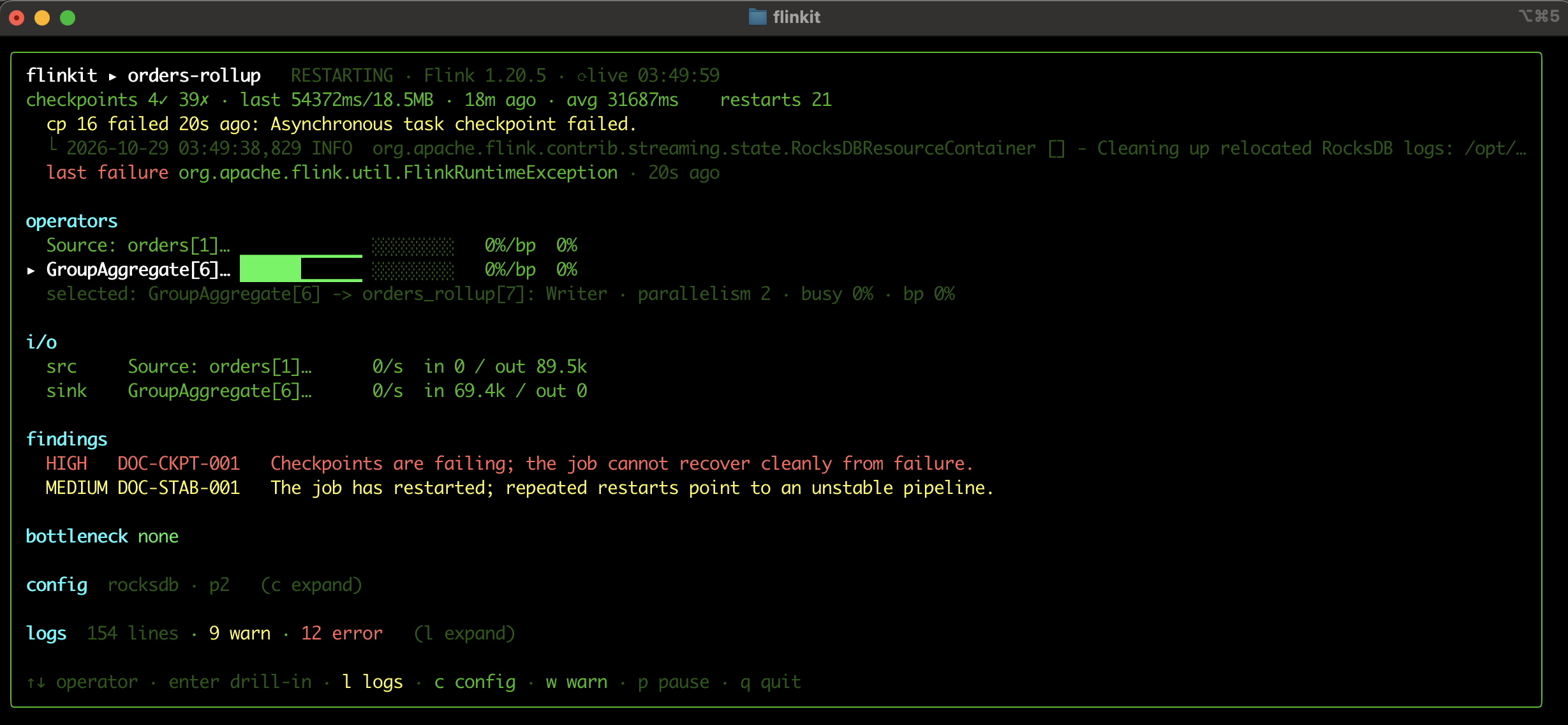
flinkit inspect orders-rollup --watchThe dashboard is organized top to bottom:
- Headline — job name, state, Flink version, and uptime.
- checkpoints — succeeded/failed counts, last size and duration, average duration, and the most recent failure reason with a correlated log line.
- restarts — the restart count and the last failover exception.
- operators — per-operator busy and backpressure, with a bar per operator; arrow keys select one to drill in.
- i/o — source and sink records-in / records-out and rates.
- findings — ranked, inline (see Findings).
- bottleneck — the choke point, or
nonewhen the job isn't throughput-bound. - config and logs — collapsible panels.
Flags
| Flag | Effect |
|---|---|
--watch | Refresh the dashboard live in place instead of printing once. |
Keybindings
While the dashboard is open:
| Key | Action |
|---|---|
| ↑ ↓ | Move between operators |
| enter | Drill into the selected operator |
| c | Expand / collapse the config panel |
| l | Expand / collapse logs |
| w | Filter logs to warnings |
| p | Pause / resume the live refresh |
| q | Quit |
flinkit bottleneck
For a throughput-bound job, bottleneck walks the operator
graph to the true choke point — not just the first
operator that shows backpressure — classifies the cause, and suggests a
fix.
$ flinkit bottleneck orders-rollupIf a job isn't backpressured, flinkit says bottleneck: none
rather than inventing one — a job can be unhealthy (e.g. failing
checkpoints) without being throughput-bound.
flinkit doctor
doctor runs flinkit's health checks and prints a ranked,
one-shot verdict — the findings, each with evidence, a fix, and a docs
link. It's primarily used to verify your flinkit setup
and get a quick overall read; for live, per-job triage reach for
inspect.
$ flinkit doctor
HIGH    DOC-CKPT-001   Checkpoints are failing; the job cannot recover cleanly from failure.
MEDIUM  DOC-STAB-001   The job has restarted; repeated restarts point to an unstable pipeline.
See Findings for what each code means and how to act on it.